R for functional programming
面向函数范式编程(Functional programming)
模拟简单的随机过程
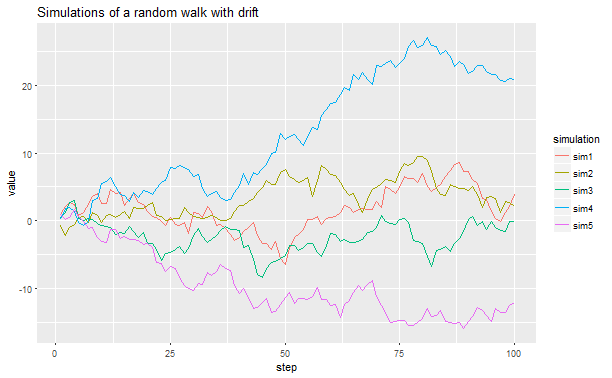
模拟一个简单的随机过程:从$N~(0,1)$标准正态分布中产生100个随机值,反复5次得到一个list,再以每个list的初始值作为起点后一个的值作为过程步的增量走到下一步,直到走到尽头。
先来看一下accumulate函数的作用
# Understanding the arguments .x and .y when .f
# is a lambda function
# .x is the accumulating value
2:6 %>% accumulate(~ .x) # 产生以3为起点方差为3的序列

## [1] 2 2 2 2 2
# .y is element in the list
2:6 %>% accumulate(~ .y)

## [1] 2 3 4 5 6
#
2:6 %>% accumulate(~ .x + .y) # 产生以2为起点2:6为累加值的序列

## [1]  2  5  9 14 20
利用accumulate尝试实现一个带有漂移的随机过程
# Simulating stochastic processes with drift
## Not run:

plotSim <- function(draft){
  rerun(5, rnorm(100)) %>% # This is a convenient way of generating sample data. It works similarly to replicate(..., simplify = FALSE).
  set_names(paste0("sim", 1:5)) %>%
  map(~ accumulate(., ~ draft + .x + .y)) %>%
  map_df(~ data_frame(value = .x, step = 1:100), .id = "simulation") %>%
  ggplot(aes(x = step, y = value)) +
    geom_line(aes(color = simulation)) +
    ggtitle("Simulations of a random walk with drift")
}
plotSim(0.001)
多数据建模
检验车辆数据集中变量单位加仑的英里数与重量之间的线性关系是否会在不同的引擎汽缸中有显出差异?
# If each element of the output is a data frame, use
# map_df to row-bind them together:
mtcars %>%
  split(.$cyl) %>%
  map(~ lm(mpg ~ wt, data = .x)) %>%
  map_df(~ as.data.frame(t(as.matrix(coef(.)))))

##   (Intercept)        wt
## 1    39.57120 -5.647025
## 2    28.40884 -2.780106
## 3    23.86803 -2.192438
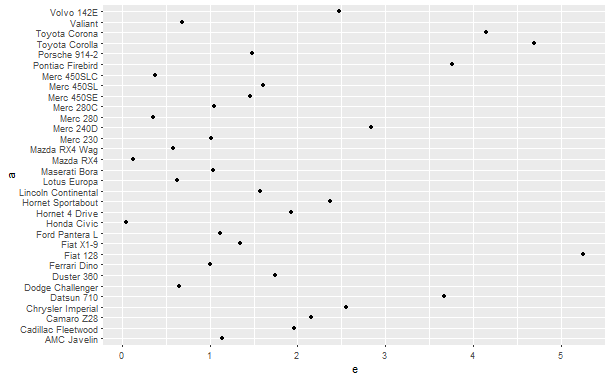
对数据集中不同的数据分别进行建模,再预测:
# Split into pieces, fit model to each piece, then predict
by_cyl <- mtcars %>% split(.$cyl)
mod <- by_cyl %>% map(~ glm(mpg ~ wt, data = .))
a <- map2(mod, by_cyl, predict) %>%
  flatten_df() %>%
  t() %>%
  as.data.frame() %>%
  mutate(a=rownames(.))

mtcars %>%
  mutate(a=rownames(.)) %>%
  left_join(a) %>%
  select(a, mpg, V1) %>%
  mutate(e = abs(mpg-V1)) %>%
  ggplot(aes(a, e))+
  geom_point()+
  coord_flip()

## Joining, by = "a"
多模型预测
对单一数据集进行多个模型训练预测:
result <- mtcars %>%
  tbl_df() %>%
  nest() %>%
  mutate(mod1 = map(data, ~ glm(mpg ~ wt, data = .)),
        mod2 = map(data, ~ lm(mpg ~ wt, data = .)),
        pred1 = map2(mod1, data, predict),
        pred2 = map2(mod2, data, predict)
  )
result

## # A tibble: 1 x 5
##                 data      mod1     mod2      pred1      pred2
##               <list>    <list>   <list>     <list>     <list>
## 1 <tibble [32 x 11]> <S3: glm> <S3: lm> <dbl [32]> <dbl [32]>
产生四个数据集,分别按照一定格式的文件命名方式保存下来
# create dfs to loop over
df <- data.frame(
  a = rnorm(10),
  b = rnorm(10),
  c = rnorm(10),
  d = rnorm(10)
)
obj <- list(df1 = df, df2 = df, df3 = df, df4 = df )


# create file names to loop over
path <- getwd()
folder <- "RDa"
names <- c("df1", "df2", "df3", "df4")

if(!file.exists(folder)){
  dir.create(folder)
  fnames <- lapply(names, function(x) paste0((file.path(path, folder)), '/', x, ".RDa"))
}
fnames <- lapply(names, function(x) paste0((file.path(path, folder)), '/', x, ".RDa"))
walk2(obj, fnames, ~ save(.x, file = .y))
dir('RDa')

## [1] "df1.RDa" "df2.RDa" "df3.RDa" "df4.RDa"